What happens when we give a small local AI model access to a Meshtastic radio?
Early in my blog writing I mentioned that I believe Meshtastic is not just about the radio technology, but about all of the peripheral activities that it can also spark. This blog is about one of those activities. So less about the radio, more about the AI.
I've been playing around with local AI models for a while now. Running models on my own laptop, experimenting with Python, trying different tools and generally seeing how much I can get out of relatively small models without sending everything to the cloud.
At the same time, I've been spending quite a bit of time with Meshtastic. Building things, testing radios, looking at packets and occasionally wondering whether I really need another project on the go.
So, naturally, I thought: why not combine the two?
What would happen if I gave a small local AI model access to a real Meshtastic radio? Could I ask it questions about the node, get it to interpret telemetry, and eventually perhaps use it to interact with the mesh?
Not by giving the AI unrestricted access to the radio, though. I wanted to build something where the AI could only do what I explicitly allowed it to do, and I wanted to see whether a relatively small model could actually be useful.
This is the story of the first experiment, including the GitHub repository.
Starting with a simple question
I decided to keep the first experiment deliberately small.
No complicated network management, no autonomous radio configuration, no clever packet routing. Just one Meshtastic node connected to a computer over USB.
The hardware for this first test was a Heltec V3, connected through a USB serial interface.
The AI model would be Qwen3.5:4B, running locally through Ollama. For the user interface, I chose Open WebUI.
The question I wanted to ask was almost embarrassingly simple:
"Tell me about the Meshtastic node connected to my computer."
But before asking that question, we needed to build a way for the AI to get the information.
Giving the AI access to the radio
I started with Python and the Meshtastic Python library. The first task was simply to establish a connection to the radio through its serial interface. I wrote a small standalone Python test to connect to the node and retrieve its local node information.
That worked and the node identified itself as:
We could also retrieve device metrics such as voltage, battery level, channel utilisation, transmit airtime utilisation and uptime. This is all rather straight forward and well documented across the internet.
Good start. But I didn't want the AI to communicate directly with the serial interface or have access to the Python environment. Instead, I introduced a small FastAPI service.
The architecture became:
FastAPI provides a controlled interface to the radio. OpenAPI describes the available operations, and Open WebUI makes those operations available to the model as tools.
At this stage, the API only exposed two operations:
- Check the application's connection status.
- Retrieve information about the locally connected node.
The API runs locally on the computer, bound to the local loopback interface. It isn't exposed to the rest of the network. This is an important distinction. The AI doesn't get unrestricted access to the radio. It gets access to a couple of explicitly defined functions.
I also decided against introducing MCP at this stage. There is nothing wrong with MCP, and it may become interesting later, but FastAPI and OpenAPI gave me a straightforward way to expose and test the functionality without introducing another layer of complexity.
The first question
With the service running, I connected it to Open WebUI and made the first request:
"Tell me about the Meshtastic node connected to my computer."
And then something rather satisfying happened.
Open WebUI invoked the function get_local_node_node_local_get, retrieved the actual information from the Heltec V3, and passed the result to Qwen. The model returned a nicely formatted explanation of the node, including its identity, role and current metrics.
This wasn't a pre-written response, nor had I copied the node information into the conversation. The model had actually called a function, the function had communicated with the physical radio, and the result had been returned to the model.
That was the first little WOOOOW moment.
Of course, getting the data is one thing. Understanding it is another.
A small model needs a little help
My next question was whether Qwen actually understood what it was looking at.
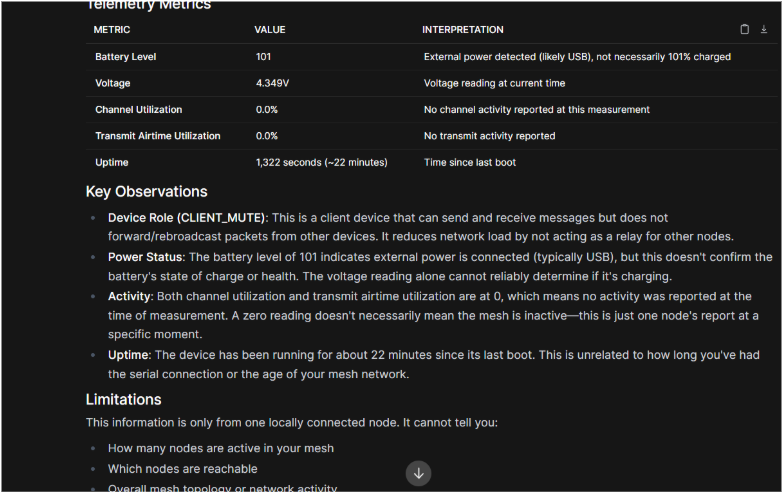
I asked it to explain the battery level, the CLIENT_MUTE role and the zero channel utilisation readings. The first answer was reasonable in places, but it missed something important.
The battery level was reported as 101. Qwen interpreted this as an unusual battery percentage and concluded that it couldn't determine whether the node was running on USB power or battery. In Meshtastic, a battery level of 101 is used as an external-power indication. It isn't a battery charged beyond 100%.
It also wasn't particularly confident about CLIENT_MUTE.
This made me think about a different approach.
Rather than changing the model or trying to squeeze more information into the initial prompt, I decided to introduce a skill. The idea is simple: give the model a set of instructions and domain knowledge describing how to use our API and interpret the information it receives.
I created a SKILL.md file containing information about the available functions, Meshtastic metrics, device roles, and some basic rules about distinguishing facts from assumptions.
I then started a new Open WebUI conversation, activated the skill and tools, and asked the original question again.
The difference was noticeable.
Qwen now correctly recognised 101 as an external-power indication. It explained CLIENT_MUTE as a client that can send and receive messages but does not rebroadcast packets from other devices. It also correctly avoided concluding that the entire mesh was inactive simply because the utilisation readings were zero.
Not bad for a 4-billion-parameter model running locally on a laptop.
But don't believe everything it tells you
I was quite pleased with the result, so naturally I decided to push it a little further. I asked Qwen to explain what happens when another node sends a message that our CLIENT_MUTE node receives.
The answer was detailed and sounded convincing.
It explained how the radio receives a packet, how firmware decodes and processes the payload, and how the packet is not added to the transmit queue for rebroadcasting. Some of this was reasonable. Some of it went further than the available evidence justified.
It also made an incorrect connection between the API's connected: true status and successful radio reception. Our API only confirms that the application reports an active serial connection. It doesn't prove that RF reception is working.
This was a useful reminder.
A well-formatted answer, complete with tables and technical terminology, doesn't necessarily mean the model knows what it's talking about. And perhaps more importantly, adding domain knowledge doesn't automatically solve hallucinations.
We need to be just as careful about what the model is allowed to conclude as we are about what tools it can access.
What have we actually achieved?
The first milestone is now complete.
We have demonstrated that:
- A small local model can invoke external functions through Open WebUI.
- Those functions can communicate with a physical Meshtastic node.
- FastAPI provides a controlled interface between the model and the hardware.
- OpenAPI makes the functions available to the AI.
- A skill can improve the model's understanding of Meshtastic terminology and telemetry.
- We can identify incorrect assumptions and improve the instructions through testing.
There are still limitations and we haven't given the model permission to send anything. That's intentional.
What's next?
The next step is to investigate what additional information we can safely expose.
Reading incoming messages would be an obvious candidate. Being able to ask questions about recent mesh activity could make the assistant considerably more useful. Eventually, we might also investigate sending messages, but that will need an explicit confirmation mechanism. I don't particularly like the idea of an enthusiastic AI deciding to announce itself to the entire mesh without asking first.
But let me not get ahead of myself.
For now, I'm quite happy that a small model running on my laptop can retrieve information from a physical Meshtastic radio, understand much of what it sees, and have a reasonably useful conversation about it.
There were a few mistakes along the way, and I'm sure there will be plenty more.
That's rather the point of experimenting, isn't it? And who knows? Perhaps we'll end up with a little AI assistant for the mesh.
One step at a time!
Written by JohanV — 2026-11-15