LoRa on 868 MHz - How the Meshtastic Settings Fit Together
A breakdown of how Meshtastic uses LoRa settings inside the EU 868 MHz band
Introduction
There’s a lot of excellent information on Meshtastic.org, and that’s the beauty of open-source: the documentation grows as the community grows. Still, many of us (myself included) are the “experiment first, read later” type. Since helping with JKPG-MESH.se, I’ve been thinking about how to make some of the more complex LoRa concepts a little more bite-size.
This post is a follow-up to my previous entry, “Why Meshtastic Uses 868 MHz”, and the goal here is simple:
- Show how the LoRa parameters used by Meshtastic interact on the 868 MHz band
- Explain why the presets look the way they do
- Give you a better feel for what’s happening under the hood
Before we dive in, one disclaimer:
The Meshtastic developers have already created excellent presets. If you don’t
have a specific application or experiment in mind, stick to those, they’re designed to be
reliable, compliant, and mesh-friendly.
With that out of the way… let’s lift the hood.
1. Understanding the 868 MHz ISM Band
Meshtastic operates inside the 868 MHz ISM band, but that doesn’t mean we use the entire band. Even this band is subdivided, with different power and duty-cycle limits depending on the exact frequency slice.
Here’s a simplified view of the EU regulation segments:
| Frequency Range (MHz) | Max Power | Duty Cycle | Notes |
|---|---|---|---|
| 868.0–868.6 | 25 mW ERP | 1% | Low duty-cycle applications |
| 868.7–869.2 | 25 mW ERP | 0.1% | Very low duty-cycle |
| 869.4–869.65 | 500 mW ERP | 10% | Meshtastic main band |
| 869.7–870.0 | 5 mW ERP | No limit | Good for sensors, low power |
Meshtastic’s EU region uses 869.400–869.650 MHz because it’s the only high-power, high duty-cycle segment. This is also why we casually say “868 MHz” even though the devices actually operate around 869.525 MHz — 868 MHz is just the name of the overall band (863–870 MHz).
2. Bandwidth — The Real Estate You Occupy
Bandwidth simply describes how wide your signal is. Meshtastic EU presets use:
- 125 kHz
- 250 kHz
- (Short Turbo would require 500 kHz, but this does not fit into the EU band segment.)
A useful way to visualise bandwidth:
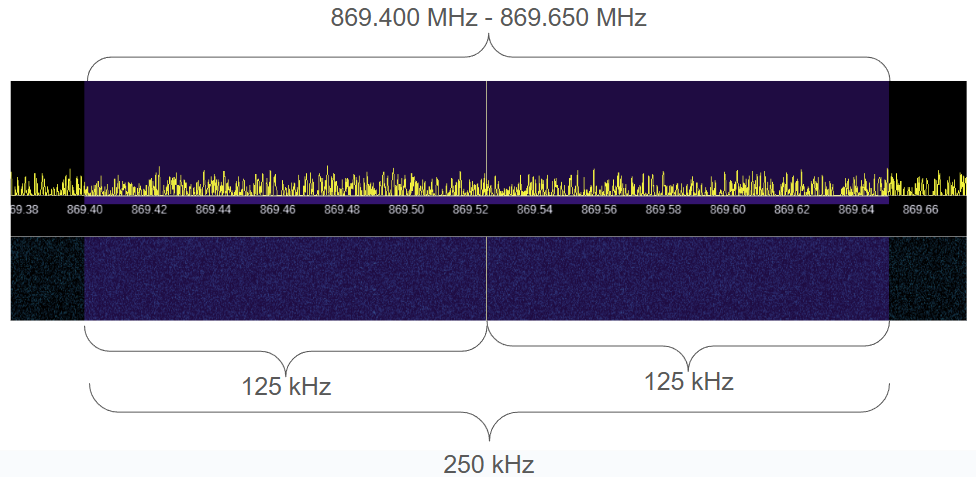
- A 250 kHz channel takes up twice as much spectral space as a 125 kHz channel.
- With 250 kHz, you can fit one channel inside the legal band.
- With 125 kHz, you can squeeze in two channels.
- With 62.5 kHz, you could theoretically manage four channels.
Of course, this only works safely if the community coordinates, because Meshtastic does not check before transmitting. You can easily jam your neighbours if you don’t plan together.
3. Meshtastic’s EU Preset Frequencies
| Name | Center Frequency | Bandwidth | ||
|---|---|---|---|---|
| Low | Center | High | ||
| Long Fast | 869.525 MHz | 250 kHz | ||
| Long Moderate | 869.4625 MHz | 869.5875 MHz | 125 kHz | |
| Long Slow | 869.4625 MHz | 869.5875 MHz | 125 kHz | |
| Medium Fast | 869.525 MHz | 250 kHz | ||
| Medium Moderate | Not implemented | — | ||
| Medium Slow | 869.525 MHz | 250 kHz | ||
| Short Fast | 869.525 MHz | 250 kHz | ||
| Short Moderate | Not implemented | — | ||
| Short Slow | 869.525 MHz | 250 kHz | ||
Note how often 869.525 MHz appears, it’s the sweet spot right in the middle of the EU high-power band and allows 250 kHz bandwidth.
4. Spread Factor - How Long Each Symbol Takes
This is where LoRa gets interesting. Spread Factor (SF) determines how long it takes to transmit one chirp (symbol). Higher SF = longer chirps = more range, more airtime, and fewer packets per second.
The formula is:
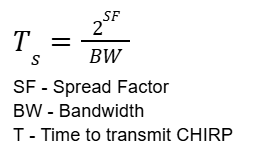
Meaning:
- Increase SF → chirp gets longer
- Decrease BW → chirp also gets longer
Example using typical presets:
- Short Fast uses SF7 → short chirps → short airtime → short range
- Long Fast uses SF11 → long chirps → long airtime → much longer range
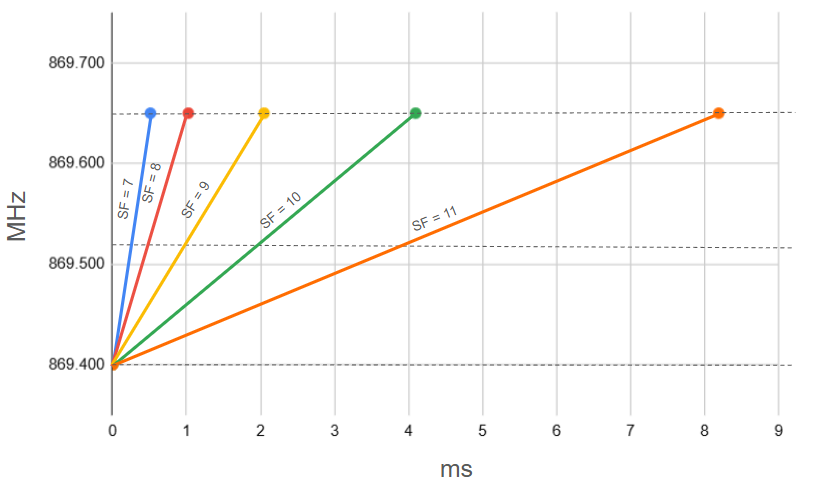
Important note about naming:
✔️ Short and Long refer to range, not airtime
✔️ Fast refers to the fastest preset within that range category
So “Long Fast” doesn’t mean “faster than Short Fast” - just the fastest within Long.
5. Coding Rate — The Hidden Trade-off
Coding Rate (CR) adds error-correction bits to each symbol. It’s written as:
- 4/5
- 4/6
- 4/7
- 4/8
Higher coding rate → more robust → slower effective data rate.
A simple way to think of it:
- CR 4/5 gives more usable bits per symbol
- CR 4/8 gives more protection but fewer usable bits
- Both increase airtime because the symbol carries more total bits
Meshtastic typically uses 4/5 because it balances reliability and speed.
6. Putting It All Together
Once you see how frequency, bandwidth, spread factor, and coding rate interact, the presets start to make sense:
- Long range → high SF + moderate CR
- Fast → lower SF
- Slow → highest SF and sometimes narrower bandwidth
- EU mode → always squeezed into one narrow legal slice
- More channels → only possible with smaller bandwidth + coordination
Every setting is a compromise between airtime, range, interference, and regulation.
Conclusion
If you’ve made it this far ... well done. My hope is that this post made you pause and think about how much happens behind the scenes when you send a simple message.
Meshtastic really is the Swiss Army knife of LoRa experimentation, but like any powerful tool, you get more out of it the deeper you dig. I certainly have, and the more I learn, the more I realise there’s still to explore.
So enjoy experimenting… and enjoy digging. Until next time!
Written by JohanV
2025-12-07