The Meshtastic MQTT Relationship
Demystifying how Meshtastic and MQTT link off-grid LoRa networks to the global internet.
If you've spent any time in the Meshtastic community beyond that initial buzz of excitedly opening your brand new unit, you’ve heard the debates: to use or not to use MQTT?
You quickly realize it’s some sort of link, a bridge that connects your long-range LoRa network to the wide-open internet. There are maps that show nodes across the world, and interact with far-away nodes. You decide to set it up, and BOOM—your local, off-grid network is now talking to the globe.
What did you just step into? Let’s demystify the powerful relationship between MQTT and Meshtastic today.
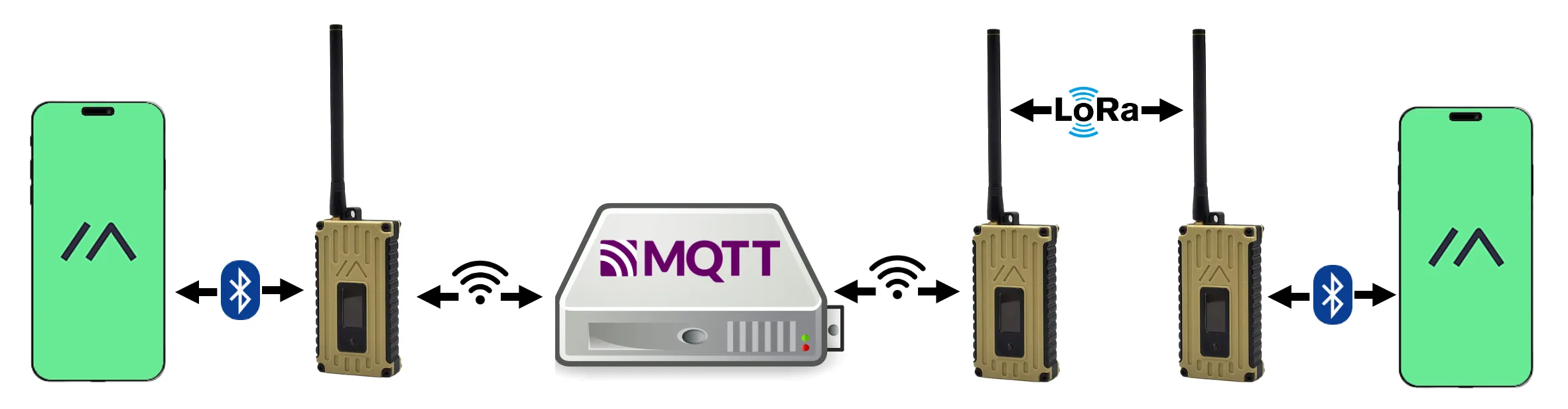
Image: MQTT bridging Meshtastic networks
© Meshtastic Project · Licensed under
GPL‑3.0
.
Source:
github.com/meshtastic/web
A Protocol Built for Constraint: What is MQTT?
MQTT stands for Message Queuing Telemetry Transport. This lightweight protocol was invented back in 1999 by Dr. Andy Stanford-Clark of IBM and Arlen Nipper of Arcom.
They needed a way to monitor SCADA control systems in the oil industry. In 1999, transporting data, especially over expensive and low-bandwidth satellite links, was costly. This created a critical need for a lightweight, bandwidth-efficient, and energy-efficient protocol. MQTT was designed as a simple, publish–subscribe, machine-to-machine network protocol—it’s brilliant because it moves small amounts of data reliably, even when connectivity is poor.
The Off-Grid Hero: How Meshtastic Fits In
Now let’s shift to Meshtastic, created much, much later in 2020. The core goal of Meshtastic is to “enable you to use inexpensive LoRa radios as a long-range off-grid communication platform in areas without existing or reliable communications infrastructure.”
Meshtastic thrives where the internet or mobile networks fails. But what if the internet is available to just one node? That’s where the power of the Meshtastic firmware, which allows for user modules to be added, comes into play. The MQTT module was incorporated to leverage this very relationship.
The Gateway: Uplink and Downlink Traffic
We now have an off-grid communication system (Meshtastic) and a super-efficient messaging protocol (MQTT). The connection point is the Gateway Node—any Meshtastic device connected to the internet via your phone's app or its own WiFi/Ethernet connection.
This gateway performs two critical tasks, routing packets through the internet:
- Uplink (Mesh to Internet): Packets received over the LoRa mesh network are published up to an MQTT broker (a central server that manages the message queue).
- Downlink (Internet to Mesh): Packets received from the MQTT broker (sent from another global network) are injected down into the local LoRa mesh network.
This bridging action is what seamlessly connects two physically distant Meshtastic networks over the public internet, making them appear as a single, massive mesh.
A Critical Stability Note: The Zero-Hop Rule
If a message comes downlink from the public MQTT server, it usually applies a Zero-Hop Policy. This means the packet is delivered to the nodes currently visible to the gateway, but it is not immediately rebroadcast by your local nodes. This is a crucial feature designed to prevent massive global traffic from flooding and saturating small, local LoRa channels.
The Power of Integration
By turning your node into an MQTT gateway, you unlock far more than just global messaging. You gain the ability to integrate Meshtastic data with powerful external applications:
- Global Node Mapping: Visualize heard nodes on public maps (like the one hosted by Liam Cottle) by routing position packets to a dedicated broker.
- External Dashboards: Connect your network to tools like Home Assistant to monitor telemetry (battery life, temperature) or environmental data from your nodes.
- Custom Bots and Bridges: Create custom MQTT agents that can parse the data to forward messages to Discord, email, or even integrate with large language models (LLMs) to provide real-time information to the off-grid mesh.
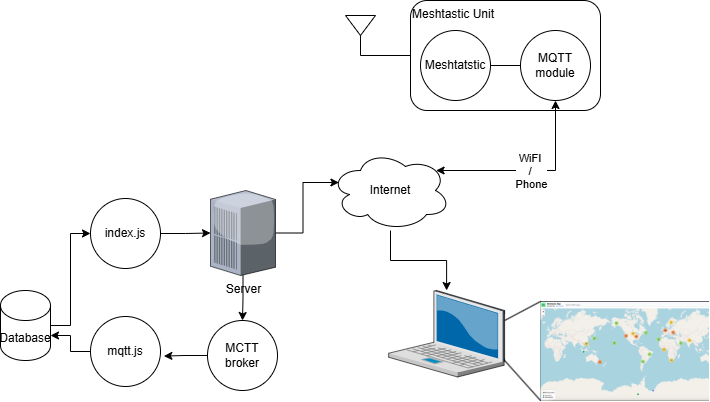
Image: MQTT bridging for Mesh Map
The lightweight design of MQTT is the big enabler here, perfectly suited for running on the compact microcontrollers used in your LoRa devices, like the Heltec V3 or XIAO nRF52840.
Your Challenge
Now that you understand the basic relationship, here’s a challenge to get you started with your own private network experiments:
- Get a Raspberry Pi (or any inexpensive Single Board Computer).
- Install an MQTT broker (like Mosquitto).
- Connect your Meshtastic unit to your local broker (instead of the public one).
- Start inventing! Try connecting a simple MQTT client like MQTT Explorer to see the raw data streams coming off your mesh.
There might be a little more reading involved to get your local Mosquitto server working, but trust me—if I could do it, you can too. Happy meshing!
Written by JohanV
2025-10-25